
Automatic TV discovery over local Wi-Fi
Official Upmixify app
Upmixify TV Remote App (Universal/Game)
One remote app with Wi-Fi, Classic Bluetooth and Modern Bluetooth- 3 modes.
OfficialUpmixify release
AndroidPhone, tablet & TV support varies
Free downloadGoogle Play available
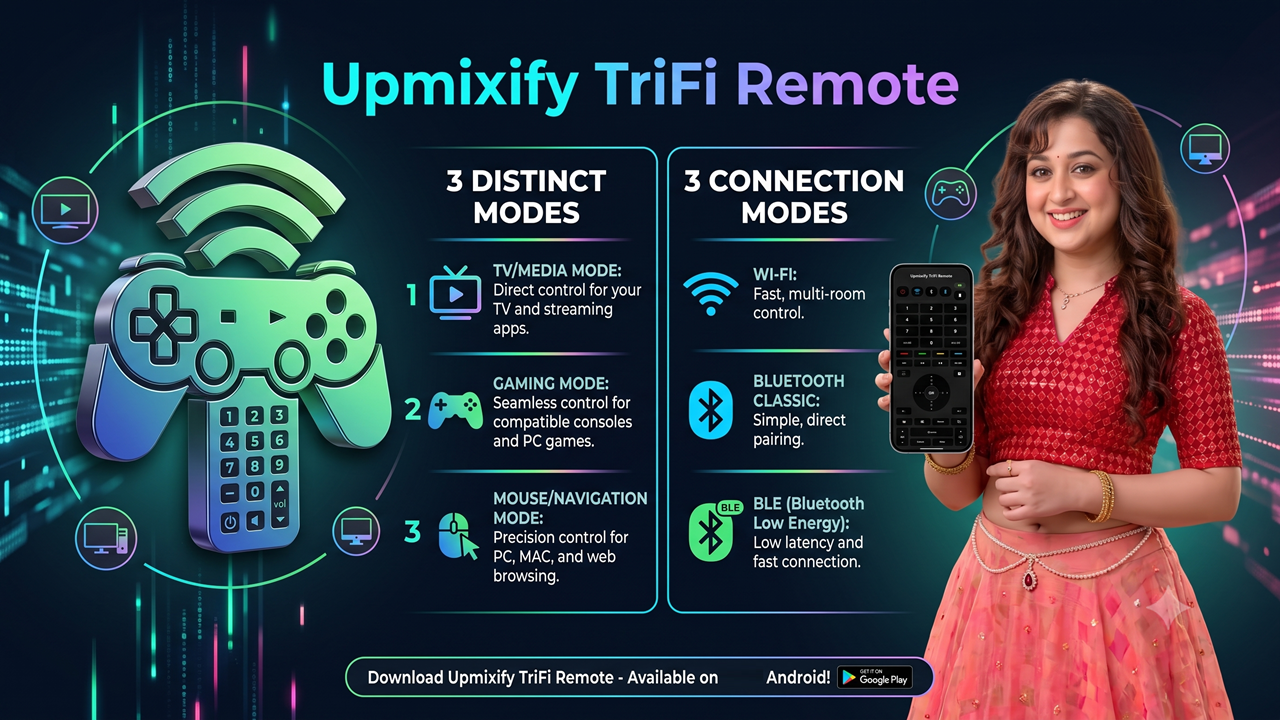
Three connection modes. Three control modes.
Upmixify TriFi Remote is the ultimate 3-in-1 smart controller for your Android TV and Google TV. Say goodbye to searching for lost remotes and experience seamless navigation, intense gaming, and premium audio control directly from your smartphone!
Whether you want to quickly switch channels, navigate streaming apps, or play Android TV games, TriFi Remote adapts to your needs with three distinct user interfaces and three powerful connection protocols.
🌟 3-in-1 Control Modes (Tailored for You)
Classic Numpad Remote: Brings back the traditional TV experience. Perfect for fast channel surfing, entering PINs, and managing DTH or cable box apps.
Modern Navigation UI: A sleek, minimal D-Pad layout designed for smooth scrolling through streaming platforms like Netflix, YouTube, and Prime Video.
Pro Game Controller Mode: Rotate your phone into landscape mode to unlock a full gamepad layout (A, B, X, Y buttons, D-pad, and triggers) to play Android TV games without buying extra hardware.
⚡ TriFi Connectivity (Never Lose Signal)
Wi-Fi Connection: Connect instantly over your home network for lightning-fast, zero-lag control.
Bluetooth Low Energy (Modern Bluetooth): highly responsive, battery-saving connection perfect for long binge-watching sessions.
Classic Bluetooth: Universal fallback compatibility ensuring your remote works with almost any Bluetooth-enabled smart TV or set-top box.
🎧 Exclusive Upmixify DSP Audio Control
Dedicated DSP Button: Enhance your TV's audio experience with a single tap.
Surround Sound Integration: Triggers the Upmixify C++ DSP engine on compatible TV apps to seamlessly switch your audio into immersive multi-channel surround sound.
Transform your smartphone into the most versatile Smart TV remote today!
Highlights
3 Connection Modes: Wi-Fi, Classic Bluetooth, Modern Bluetooth 3 Control Modes: Modern Remote, Full Remote, Game Controller
Classic Bluetooth HID and Modern Bluetooth modes
Full number pad and media keys
Touchpad navigation
Voice input on supported Wi-Fi connections
Game controller modes
Watch
See Upmixify TV Remote App (Universal/Game) in action
Frequently asked questions
Upmixify TV Remote App (Universal/Game) FAQ
Practical answers about features, compatibility, downloads and common Upmixify TV Remote App (Universal/Game) use cases.
How can I use my Android phone as a remote for Android TV or Google TV?
Upmixify TV Remote App can turn a compatible Android phone into a controller for supported Android TV, Google TV and TV boxes using available Wi-Fi or Bluetooth connection modes.
What does Universal/Game mean in the Upmixify TV Remote App?
The app combines everyday TV navigation with multiple remote layouts and a Game Controller mode, allowing the phone to act as a general remote or as a controller for supported TV gaming use cases.
Does the Upmixify TV Remote App support Wi-Fi and Bluetooth connections?
Yes. The app listing includes local Wi-Fi discovery, Classic Bluetooth HID and Modern Bluetooth connection modes. Compatibility depends on the phone, TV device and supported Bluetooth profiles.
Can I use the remote app if Wi-Fi is not available?
A supported Bluetooth mode may provide an alternative on compatible devices. Whether it works depends on the Bluetooth capabilities and pairing support of both the phone and the television or TV box.
Does the TV remote include a touchpad, number pad and media buttons?
The listed interfaces include a Modern Remote, a Full Remote with number pad and media keys, plus touchpad support for compatible controls.
Can I use the phone as a game controller for Android TV games?
The app includes a Game Controller mode intended for supported TV games or apps. Individual games decide which controller inputs they accept.
Can the app automatically find a TV on the same local Wi-Fi network?
Automatic TV discovery over local Wi-Fi is listed as a feature. Both devices generally need to be reachable on the same local network, and some routers may isolate clients.
Why can the remote discover my TV but not send button presses?
Discovery and control can use different protocols. Pairing permissions, TV-side services, Bluetooth profiles, network isolation or unsupported key handling can allow discovery while blocking control.
Does Upmixify TV Remote work with every smart TV brand?
It is aimed at compatible Android TV, Google TV and supported TV-box environments. A universal name does not mean every proprietary smart-TV operating system or every model is guaranteed to work.
Is voice input available in the Upmixify TV Remote App?
Supported voice input is listed among the remote features. Availability depends on device permissions, Android services and the receiving TV environment.
Is Upmixify TV Remote App (Universal/Game) free to download on Android?
The public app page shows the current price and official download options. When the page shows Free, the app can be downloaded without an upfront app purchase, although optional ads, purchases or external service costs may still depend on the app version.
Where can I download the official Upmixify TV Remote App (Universal/Game) app safely?
Use the official Google Play button on this page when available. If Upmixify publishes a direct APK, this page also shows the official direct-download option so you do not need to rely on an unknown third-party APK website.
Does Upmixify TV Remote App (Universal/Game) work on Android TV, Google TV, phones and tablets?
Device support varies by app. Some Upmixify apps are specifically designed for Android TV while others focus on phones or tablets. Check the app description and Google Play compatibility for the exact device you plan to use.
Why might Upmixify TV Remote App (Universal/Game) behave differently on different Android devices?
Android versions, hardware decoders, audio routes, Bluetooth profiles, storage permissions and manufacturer changes can affect app behavior. Updating Android system components and the app can help with compatibility.
How do I get the latest version of Upmixify TV Remote App (Universal/Game)?
Google Play is the recommended source for automatic updates when the app is listed there. If an official direct APK is provided on this page, its version label can be used to compare releases.
Upmixify FTA Media Server
Turn your Android device into a personal media server for your local network.
View app →
Upmixify FTA Network/IPTV Player
Play your own M3U, SAT>IP, DLNA, UDP/RTP and local media sources.
View app →
Upmixify 5.1+ Surround Audio Player
Play stereo music with immersive spatial and virtual surround processing.
View app →
Upmixify — 5.1+ Surround Audio Converter
Convert mono or stereo audio into multi-channel surround audio on your device.
View app →