
Android TV and Google TV optimized

Official Upmixify app
TV File Manager
A remote-friendly file manager made for the big screen.
OfficialUpmixify release
AndroidPhone, tablet & TV support varies
Free downloadGoogle Play available
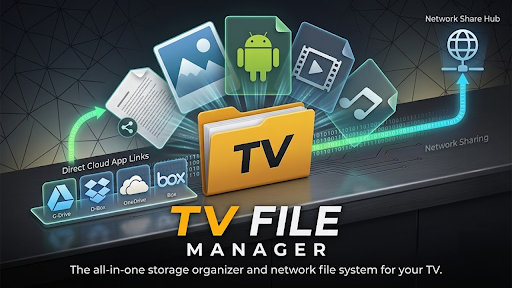
A remote-friendly file manager made for the big screen.
Browse, copy, move, rename and organise local or external files with a clean interface designed for D-pad, keyboard, touch and mouse input.
Highlights
What you can do
Internal and USB storage management
SMB local-network browsing
APK management
ZIP archive extraction
Favorites, search and quick access
Watch
See TV File Manager in action
Frequently asked questions
TV File Manager FAQ
Practical answers about features, compatibility, downloads and common TV File Manager use cases.
What is a good file manager for Android TV and Google TV with D-pad support?
TV File Manager is designed for big-screen navigation using a TV remote or D-pad and supports common file operations on internal, external and network storage.
Can I copy, move, rename and organize files on Android TV?
Yes. The app is designed for browsing and organizing supported files with copy, move, rename and related file-management actions.
Does TV File Manager support USB drives connected to an Android TV?
The app includes external and USB storage management when the Android device exposes the drive and grants the required storage access.
Can I browse SMB network shares from my Android TV?
SMB local-network browsing is listed as a feature, allowing supported network shares to be accessed from compatible Android TV or Google TV devices.
Can the file manager install or manage APK files on Android TV?
APK management is listed among the app features. Android security settings and install permissions still control whether an APK can be installed.
Can I extract ZIP archives directly on Android TV?
ZIP archive extraction is included in the listed file-management features for supported archives and writable storage locations.
Does the app support search, favorites and quick access folders?
Yes. The app listing includes favorites, search and quick-access features to make large TV storage libraries easier to navigate.
Can I use a keyboard or mouse instead of only a TV remote?
The interface is designed for D-pad use and also supports common input methods such as keyboard, touch or mouse where the Android device provides them.
Why is an external drive visible but some folders cannot be edited?
Android storage permissions, read-only file systems, protected system folders or the drive format can limit write access even when the drive itself is visible.
Is TV File Manager made specifically for television screens?
Yes. Its layout and navigation are optimized around Android TV and Google TV usage rather than being only a phone file manager stretched onto a large screen.
Is TV File Manager free to download on Android?
The public app page shows the current price and official download options. When the page shows Free, the app can be downloaded without an upfront app purchase, although optional ads, purchases or external service costs may still depend on the app version.
Where can I download the official TV File Manager app safely?
Use the official Google Play button on this page when available. If Upmixify publishes a direct APK, this page also shows the official direct-download option so you do not need to rely on an unknown third-party APK website.
Does TV File Manager work on Android TV, Google TV, phones and tablets?
Device support varies by app. Some Upmixify apps are specifically designed for Android TV while others focus on phones or tablets. Check the app description and Google Play compatibility for the exact device you plan to use.
Why might TV File Manager behave differently on different Android devices?
Android versions, hardware decoders, audio routes, Bluetooth profiles, storage permissions and manufacturer changes can affect app behavior. Updating Android system components and the app can help with compatibility.
How do I get the latest version of TV File Manager?
Google Play is the recommended source for automatic updates when the app is listed there. If an official direct APK is provided on this page, its version label can be used to compare releases.
Upmixify FTA Media Server
Turn your Android device into a personal media server for your local network.
View app →
Upmixify TV Remote App (Universal/Game)
Control compatible Android TV, Google TV and TV boxes using Wi-Fi, Classic Bluetooth or Modern Bluetooth.
View app →
Upmixify FTA Network/IPTV Player
Play your own M3U, SAT>IP, DLNA, UDP/RTP and local media sources.
View app →
Upmixify 5.1+ Surround Audio Player
Play stereo music with immersive spatial and virtual surround processing.
View app →